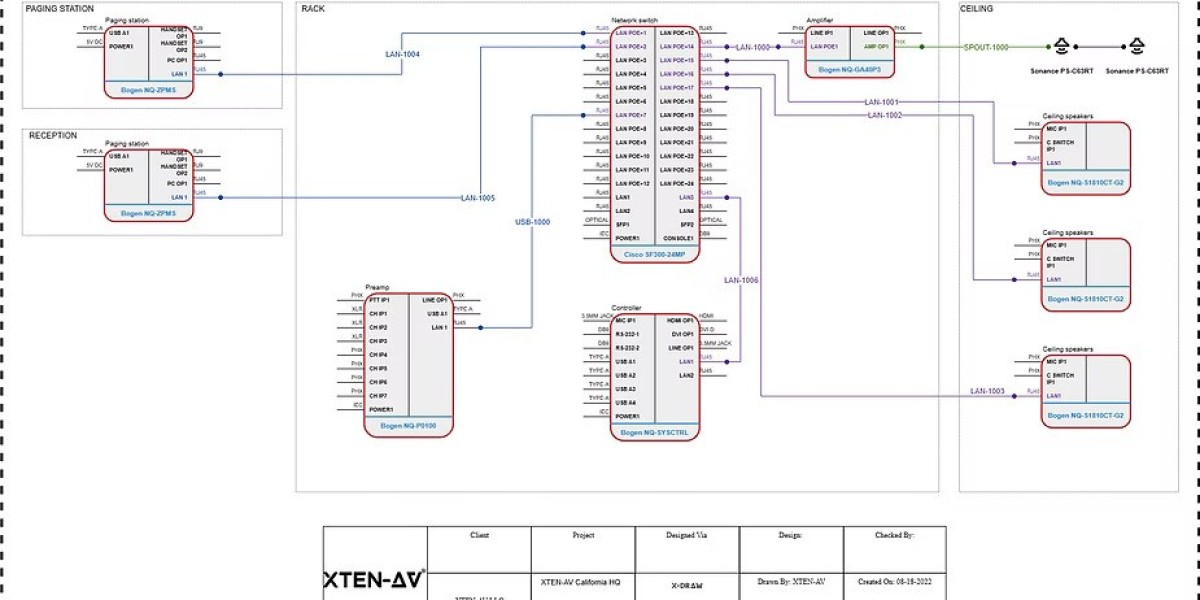


In the ever-evolving world of AV integration, the design phase sets the foundation for project success. Accurate, detailed, and well-documented designs are essential for seamless installations, efficient troubleshooting, and future upgrades. At the top of AV design innovation stands XTEN-AV, a platform built to streamline AV workflows and empower designers with the right tools.
While CAD software is a staple in AV design, not all features are created equal. AV projects have unique requirements compared to architectural, electrical, or mechanical projects, and the right CAD features can make a significant difference in accuracy, efficiency, and collaboration. This blog explores the CAD features that matter most for AV designers, why they are important, and how they optimize the design-to-installation workflow.
1. Accurate Equipment Libraries
One of the most critical CAD features for AV designers is access to comprehensive equipment libraries. AV projects involve a wide variety of devices, including:
Projectors and screens
Speakers and amplifiers
Microphones and control systems
Video walls and LED panels
Signal routing equipment
Generic CAD symbols often fail to capture the exact dimensions, mounting requirements, and connectivity details of AV devices. Accurate libraries allow designers to place real-world devices in their drawings, minimizing the risk of installation errors.
With platforms like XTEN-AV, designers can access manufacturer-specific libraries that include accurate models, connector types, and mounting specifications. This feature saves hours of manual adjustments and ensures that designs are realistic and executable.
2. Signal Flow and Connectivity Tools
AV systems are more than just devices—they are networks of signals that need to be routed efficiently. CAD software with built-in signal flow and connectivity tools allows designers to:
Map audio, video, and control signals
Identify signal paths and potential conflicts
Plan cable types, lengths, and termination points
Generate clear documentation for installers
Without these tools, designers might rely on spreadsheets or manual diagrams, increasing the risk of errors and miscommunication. Proper signal flow representation ensures that all devices are correctly connected and functional from day one.
3. Layer Management and Organization
AV designs often contain hundreds of components, including equipment, cables, racks, and annotations. Layer management features are essential to organize these elements efficiently.
Key benefits include:
Hiding or displaying specific systems such as audio, video, or lighting
Simplifying edits without affecting unrelated components
Facilitating collaboration by allowing team members to focus on relevant layers
Well-managed layers reduce confusion, prevent accidental modifications, and ensure that drawings remain readable and professional. XTEN-AV provides robust layer management tools tailored for AV projects, allowing designers to work more efficiently and accurately.
4. Scalable Rack Elevations
Rack elevations are a crucial part of AV design, detailing the physical layout of devices within equipment racks. CAD software should enable designers to:
Create accurate rack layouts with correct spacing
Include ventilation and cable management considerations
Adjust configurations easily as devices or requirements change
Without this feature, engineers might rely on manual calculations or templates that do not reflect the actual equipment dimensions, leading to installation errors and rework. Scalable and editable rack elevation tools save time and improve installation accuracy.
5. Projection and Speaker Placement Tools
Proper placement of projectors and speakers is essential for achieving optimal viewing angles, coverage, and audio quality. CAD software with integrated projection and acoustic tools helps designers:
Calculate throw distances for projectors
Determine screen sizes and placement
Map speaker coverage and audio zones
Identify potential blind spots or overlaps
These tools eliminate guesswork, allowing designers to create precise layouts that meet performance expectations. When combined with accurate device libraries, projection and speaker placement tools ensure a seamless AV experience in any space.
6. Annotation and Documentation Features
Clear documentation is essential for installers, technicians, and future maintenance teams. CAD software should provide robust annotation tools to include:
Device names and specifications
Signal types and routing information
Rack numbers and elevations
Installation notes and warnings
AV-specific CAD platforms like XTEN-AV enable designers to generate standardized documentation quickly, ensuring that all stakeholders understand the system and can execute it accurately. Proper documentation reduces errors and improves project handoffs.
7. Compatibility and Collaboration Tools
AV projects often involve multiple stakeholders using different software versions or platforms. CAD features that enhance compatibility and collaboration are vital, including:
File version control and updates
Cloud-based collaboration for real-time edits
Compatibility with other CAD formats used by architects, engineers, or integrators
These features minimize disruptions caused by version mismatches or incompatible files, allowing projects to progress smoothly. Collaboration tools ensure that design changes are reflected across all team members, reducing the risk of errors.
8. Customizable Templates and Automation
Time efficiency is critical for AV designers, and CAD features that allow automation and template use can significantly reduce repetitive work. These include:
Pre-built templates for common room types or equipment layouts
Automated cable routing or signal mapping
Batch updates for symbols or annotations
Customizable templates and automation reduce manual effort, maintain consistency across projects, and allow designers to focus on more complex and creative tasks.
9. 3D Visualization and Simulation
While 2D drawings are essential, 3D visualization helps AV designers understand spatial relationships and system interactions. CAD software with 3D capabilities allows:
Virtual walkthroughs of rooms
Accurate visualization of projector throw, speaker coverage, and device placements
Detection of potential clashes with architectural elements
Simulation tools ensure that the design works in the real environment before installation, minimizing costly adjustments on site.
10. Integration with AV Project Management Tools
Finally, CAD software should integrate seamlessly with AV project management platforms. Integration enables designers to:
Track project progress and revisions
Manage equipment inventories
Sync design updates with installation schedules
By combining CAD and project management, AV teams can maintain visibility, accountability, and efficiency throughout the project lifecycle. XTEN-AV exemplifies this integration, making it easier for AV designers to move from concept to installation without unnecessary delays.
Conclusion
Not all CAD features are equally valuable for AV designers. While generic CAD software may provide basic drawing capabilities, AV projects require specialized tools that address the unique challenges of audio visual integration. Accurate equipment libraries, signal flow tools, layer management, rack elevations, projection and speaker placement features, and robust documentation capabilities are essential.
Platforms like XTEN-AV provide these AV-specific CAD features, streamlining the design process, reducing errors, and improving collaboration. By leveraging tools tailored for AV design, engineers can save time, deliver precise designs, and ensure successful project handoffs.
In a competitive AV industry, selecting CAD software with the right features is not just a matter of convenience—it is a strategic decision that directly impacts project efficiency, accuracy, and client satisfaction. Choosing the right platform ensures that every project, from conference rooms to large auditoriums, is designed with precision and executed flawlessly.
Read more: https://soundsightav.odoo.com/blog/our-blog-1/how-cad-mistakes-cost-av-businesses-thousands-100










