

Introduction
Technology has transformed the retail industry, but demonstrating that technology effectively at a trade show requires more than putting a screen inside a booth. Modern Retail innovation expo exhibits need to turn complex solutions into experiences that visitors can understand, explore, and remember. A well-designed technology-focused exhibit can help retailers see how a solution works in a real-world environment while giving exhibitors opportunities to start valuable business conversations.
Retail technology can include artificial intelligence, customer analytics, smart shelves, digital payments, inventory platforms, augmented reality, automated systems, personalization tools, and many other innovations. The challenge is communicating their value quickly in a crowded exhibition hall.
Visitors do not want to read a long technical explanation. They want to see what the technology does and, ideally, experience it themselves.
That is why experiential technology demonstrations are becoming such an important part of modern retail exhibition design.
In this guide, we explore creative ways to showcase technology, attract visitors, encourage interaction, and turn innovative products into memorable exhibition experiences.
Why Technology Demonstrations Matter
Retail technology can be complicated.
A software platform may have dozens of features, while an AI system may rely on sophisticated algorithms that are difficult to explain through traditional marketing materials.
A demonstration makes those concepts easier to understand.
Instead of telling visitors:
“Our platform provides real-time retail analytics.”
you can show them a dashboard where they can explore store performance data.
Instead of saying:
“Our technology personalizes customer experiences.”
you can demonstrate how recommendations change based on customer behavior.
Seeing technology in action creates a stronger connection between the product and its potential business value.
1. Build a Mini Smart Store
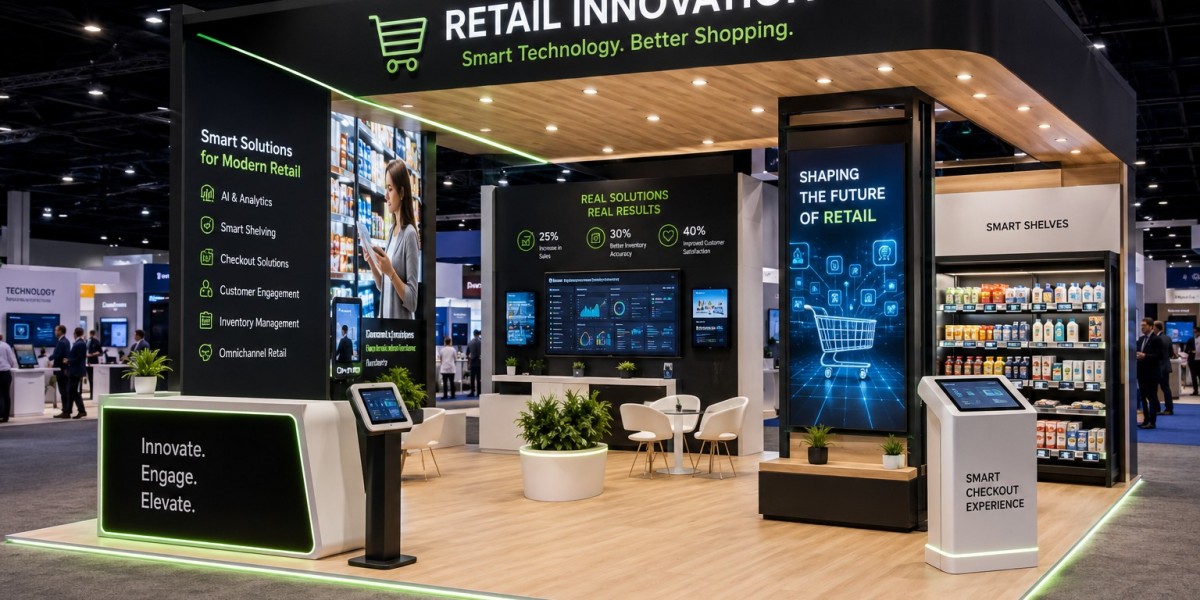
One of the most engaging ways to showcase retail technology is to create a miniature smart-store environment.
Rather than displaying individual products separately, combine multiple solutions into one realistic environment.
A smart-store exhibit could include:
Digital shelves
Electronic shelf labels
Smart inventory tracking
Contactless payment
Interactive displays
Customer analytics
Digital signage
AI recommendations
Visitors can walk through the environment and experience how different technologies work together.
This approach helps them imagine how similar systems could operate in their own stores.
2. Create an Interactive Product Journey
Instead of simply presenting your technology, build an experience around a fictional customer.
For example, a visitor could follow a shopper through several stages:
Discover
The customer receives personalized product recommendations.
Explore
Digital displays provide additional information.
Purchase
A contactless checkout solution simplifies the transaction.
Post-Purchase
An automated system provides personalized follow-up.
The visitor sees how your technology contributes to the entire customer journey.
This storytelling approach makes technical solutions easier to understand.
3. Use Interactive Touchscreens
Touchscreens remain one of the most versatile technologies for exhibition booths.
A touchscreen can allow visitors to:
Explore product features
Compare solutions
View case studies
Analyze data
Customize products
Watch demonstrations
Explore store layouts
The key is to make the interaction intuitive.
A visitor should be able to walk up to the screen and understand what to do within seconds.
Use simple prompts such as:
Explore the Platform
Build Your Store
Analyze the Data
Try the Experience
Simple instructions can dramatically reduce hesitation.
4. Let Visitors Test Your Software
If your company sells retail software, do not rely exclusively on videos.
Give visitors access to a working or simulated version of the platform.
For example, a retail analytics company could provide sample data.
Visitors could choose a store and examine:
Sales
Inventory
Customer traffic
Conversion
Product performance
They can then experiment with the interface.
This hands-on approach allows potential customers to evaluate usability.
It also gives your sales team a natural opportunity to ask questions about the visitor's current systems.
5. Use AI-Powered Recommendations
Artificial intelligence can create personalized booth experiences.
Instead of showing every visitor the same content, an AI-powered system could ask a few questions.
For example:
What is your biggest retail challenge?
Inventory management
Customer engagement
Checkout efficiency
Store operations
Personalization
The system can then recommend relevant demonstrations.
This makes the experience feel customized.
It can also help exhibitors qualify leads.
6. Create an AI Retail Assistant
An AI-powered digital assistant can become an interactive feature of the booth.
Visitors can ask questions about:
Products
Features
Pricing
Applications
Industry use cases
Integrations
The assistant can provide immediate answers while directing visitors toward relevant demonstrations.
However, the AI should supplement your team rather than replace them.
When a visitor shows strong interest, a human representative should step in and continue the conversation.
7. Demonstrate Real-Time Analytics
Retail businesses rely heavily on data.
An interactive analytics dashboard can show visitors how your technology transforms raw information into useful insights.
Create a simulated retail environment with changing data.
Visitors might adjust:
Store traffic
Product demand
Inventory levels
Promotions
Pricing
The dashboard can then show how those changes affect business outcomes.
This turns an abstract analytics platform into a practical experience.
8. Use Augmented Reality
Augmented reality can overlay digital information onto physical objects.
For retail exhibitors, this can be particularly useful for:
Product visualization
Store planning
Merchandising
Packaging
Product customization
Digital information
Imagine pointing a tablet toward a physical shelf and seeing a digital representation of how different products could be arranged.
Visitors can explore multiple configurations without physically rebuilding the display.
9. Create a Virtual Retail Environment
Virtual reality can take visitors beyond the physical booth.
A VR experience could transport them into:
A futuristic supermarket
A smart convenience store
A digital showroom
An automated warehouse
A personalized shopping environment
Visitors can experience technologies that would be impossible to recreate fully within the booth.
Keep the experience short and focused.
A two-minute immersive demonstration may be more effective than a complicated ten-minute journey.
10. Use Product Configurators
Product configurators allow visitors to customize a solution according to their needs.
For example, a retail technology provider could allow visitors to select:
Store size
Number of locations
Required integrations
Technology features
Customer experience goals
The system can then create a recommended solution.
This makes the visitor part of the product discovery process.
It also gives your sales team valuable information about the prospect.
11. Gamify Technology Demonstrations
Technology does not have to feel technical.
Gamification can make demonstrations more approachable.
Create a challenge such as:
Can You Build the Store of the Future?
Visitors could make decisions about:
Inventory
Staffing
Customer experience
Technology
Pricing
The system gives them a score based on their decisions.
The experience can then demonstrate how your technology could help improve their results.
12. Create a Retail Innovation Challenge
Another option is to create a timed challenge.
For example:
Improve Store Performance in 90 Seconds.
Visitors receive a simulated retail scenario.
They must identify a problem and select the appropriate solution.
The system then shows the outcome.
This format creates excitement and encourages participation.
It can also attract attention from people walking through the exhibition hall.
13. Use Large LED Displays
Large LED screens can provide powerful visual impact.
They can display:
Product demonstrations
Animated data
Customer journeys
Brand stories
Retail environments
Product launches
However, avoid using LED walls simply as decorative backgrounds.
The content should communicate something meaningful.
A large screen showing a live product interface can be much more useful than generic brand animation.
14. Create a Digital Twin
A digital twin can provide a virtual representation of a physical retail environment.
Visitors could interact with a digital model of a store.
They might change:
Product placement
Customer pathways
Staffing
Lighting
Displays
Inventory
The system can show how these changes affect store performance.
This creates an engaging way to demonstrate complex optimization technology.
15. Demonstrate Personalized Shopping
Personalization is a major focus in modern retail.
Create an interactive demonstration showing how technology can adapt to individual shoppers.
For example, a visitor could select a customer profile.
The system might then display:
Personalized recommendations
Relevant promotions
Product suggestions
Loyalty rewards
Customized content
Switching between customer profiles can demonstrate how the system responds to different behaviors.
16. Show the Technology Behind the Experience
Sometimes visitors want to understand what happens behind the scenes.
Create a visual representation of the technology ecosystem.
For example:
Customer → Digital Interface → AI Engine → Data Platform → Recommendation → Purchase
A simple animated diagram can help explain complex integrations.
This is especially useful when your solution connects multiple systems.
17. Use Live Demonstration Stations
Create dedicated areas where visitors can see technology working.
Each station should focus on one specific capability.
For example:
Station One
Inventory intelligence.
Station Two
Customer analytics.
Station Three
Personalization.
Station Four
Checkout technology.
This makes the experience easier to navigate.
Visitors can choose the area most relevant to their needs.
18. Connect Physical and Digital Elements
The strongest technology exhibits often combine physical and digital experiences.
For example, place a physical retail shelf next to an interactive display.
Visitors can touch the physical product while using the screen to explore:
Product information
Inventory status
Customer reviews
Recommendations
Pricing
This creates a richer experience than either physical or digital content alone.
19. Make Technology Socially Shareable
A creative digital installation can encourage visitors to photograph or record their experience.
Consider creating:
Interactive digital walls
Personalized visual outputs
Immersive installations
Digital photo opportunities
Real-time visualizations
Make sure your branding is naturally incorporated into the experience.
Social sharing can extend the reach of your exhibition presence beyond the physical venue.
20. Create a Personalized Digital Takeaway
Do not let the visitor experience end when they leave the booth.
At the end of an interactive experience, offer a personalized digital takeaway.
For example:
Your Retail Innovation Profile
The system could summarize:
Visitor's selected challenges
Recommended solutions
Relevant products
Suggested next steps
The visitor can receive the information by email or access it through a QR code.
This creates continuity between the exhibition and post-show engagement.
Make Technology Easy to Understand
One of the biggest mistakes exhibitors make is assuming visitors want technical complexity.
They usually want outcomes.
Instead of focusing only on how the technology works, explain what it helps accomplish.
For example:
Technology Feature: Real-time inventory analytics.
Business Benefit: Identify stock issues earlier and make better replenishment decisions.
The second statement is easier for a business decision-maker to understand.
Connect Demonstrations to Real Business Problems
Every demonstration should answer a business question.
For example:
How can retailers reduce checkout friction?
Demonstrate contactless checkout.
How can retailers improve inventory visibility?
Demonstrate real-time inventory analytics.
How can retailers personalize customer experiences?
Demonstrate AI-powered recommendations.
This approach makes the technology relevant.
Keep Interactive Experiences Short
Trade show visitors are busy.
They may have dozens of booths to visit.
Your technology demonstration should provide value quickly.
A good experience might take:
30 seconds for a quick interaction
1–3 minutes for a standard demonstration
5 minutes for an in-depth consultation
Offer different levels of engagement.
Visitors who are curious can start with a short experience.
Qualified prospects can continue into a deeper conversation.
Make the Interface Intuitive
Your technology should not require extensive instructions.
Use:
Large buttons
Clear labels
Simple menus
Visual cues
Short instructions
Test the experience with people who are unfamiliar with your product.
If they cannot figure it out quickly, simplify it.
Train Your Staff
Technology cannot replace knowledgeable booth representatives.
Your team should know:
How each demonstration works
What the key benefits are
How to answer questions
How to identify qualified prospects
How to transition from demonstration to conversation
Staff should also be comfortable troubleshooting basic technical problems.
Always Have a Backup Plan
Technology can fail.
Internet connectivity can be unreliable.
Software can freeze.
Hardware can malfunction.
Have backup content available.
If your live demonstration depends on an internet connection, create an offline version.
If a touchscreen stops working, have printed information or another device available.
Visitors should still receive a useful experience even when technology encounters problems.
Measure Technology Engagement
Interactive systems can provide useful performance data.
Track:
Number of interactions
Average engagement time
Demonstrations completed
Product selections
QR scans
Leads generated
Meetings scheduled
These metrics can reveal which experiences are producing the strongest results.
For example, if an interactive game attracts many visitors but produces few qualified leads, you may need to connect it more directly to your product offering.
Avoid Technology Overload
It can be tempting to include every new technology available.
But too much technology can make a booth confusing.
Imagine entering a booth with:
Five large screens
Multiple VR headsets
Several touchscreens
Interactive walls
Audio effects
Games
Digital kiosks
Where should you look first?
The visitor may not know.
Instead, choose a few technologies that support your message.
A focused experience is often more effective than a technological showcase with no clear purpose.
Integrate Technology With Your Booth Design
Technology should feel like part of the architecture.
Screens should be positioned where they are easy to see.
Interactive stations should have enough surrounding space.
VR areas should not block major pathways.
Lighting should highlight technology without creating glare.
Power and connectivity should be planned before construction.
Good integration makes the entire booth feel intentional.
Choose the Right Exhibit Partner
A technology-focused booth requires more than basic construction.
Your exhibit partner should understand:
Digital integration
Interactive displays
Electrical requirements
Lighting
Audio
Internet connectivity
Custom fabrication
Installation
Technical support
Ask to see examples of technology-driven booths they have produced.
Discuss your concept early.
A good partner can help determine how technology can be incorporated without sacrificing visitor flow or visual clarity.
Plan for the Entire Customer Journey
The technology experience should connect with your wider marketing strategy.
Before the event:
Promote your demonstration
Schedule meetings
Invite key prospects
During the event:
Capture leads
Record visitor interests
Encourage demonstrations
Schedule follow-up meetings
After the event:
Send personalized content
Follow up with qualified prospects
Share requested materials
Continue the conversation
This turns your booth from a temporary display into part of a larger customer journey.
Final Thoughts
Retail technology is changing quickly, and trade show exhibitors have new opportunities to demonstrate innovation in engaging ways. Interactive touchscreens, smart-store simulations, AI assistants, augmented reality, virtual reality, gamification, digital twins, real-time analytics, and personalized experiences can make complex technologies easier to understand.
However, the best technology exhibit is not necessarily the one with the most impressive equipment. It is the one that helps visitors understand a problem, experience a solution, and see how that solution could benefit their business.
Start with your audience and objectives. Identify the most important business problems you want to address. Then choose technologies that make those problems and solutions easier to visualize.
Give visitors something meaningful to do. Let them test your platform, customize a solution, explore a smart-store environment, or solve a retail challenge. Then connect that experience to a conversation with your team and a clear next step.
With thoughtful planning, reliable technology, compelling storytelling, and professional booth construction, your exhibition presence can become a memorable demonstration of what your company brings to the future of retail. If you're planning an upcoming event and want to develop an engaging technology-driven booth, explore Retail innovation expo exhibits to compare exhibit-building solutions and create an experience designed around your brand and visitors.









