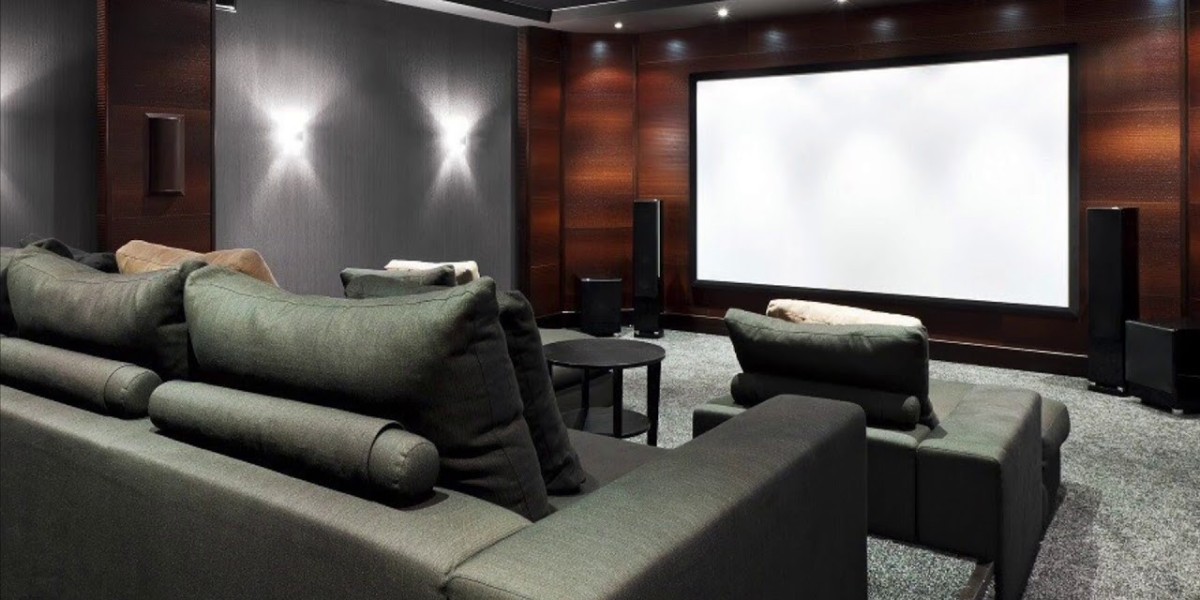


Bring the Cinema Experience Home
A home theater can turn an ordinary room into a comfortable entertainment space for movies, sports, gaming, and family gatherings. The right combination of display equipment, sound, lighting, and seating can make viewing more enjoyable. Careful planning is important because every room has different dimensions, lighting conditions, and installation requirements that influence the final setup.
Plan the Projector Installation
Before purchasing equipment, consider where the projector and screen will be placed. Room dimensions, ceiling height, viewing distance, and available mounting locations all affect the installation. Home Theater Projector Installation Tempe AZ can help homeowners approach the setup with attention to positioning, image quality, and room requirements. Planning these details early can reduce adjustments after the equipment is installed.
Choose a Suitable Projector
Projectors come with different brightness levels, resolutions, connectivity options, and display technologies. The right model depends on the room and how it will be used. A bright room may require a projector with stronger light output, while a dedicated theater room may allow more control over lighting. Compare specifications carefully and consider the viewing experience you want to achieve.
Select the Right Screen Location
Screen placement has a major influence on comfort and visibility. The screen should be positioned so viewers can watch without constantly looking upward or turning their heads. Consider seating arrangements, wall space, and the distance between the screen and the audience. A suitable screen size should provide an engaging picture without overwhelming the room.
Understand Mounting and Positioning
Projector mounting requires attention to alignment, distance, and stability. Ceiling mounts can help keep equipment out of the way, while other placement options may work better in certain rooms. The projector lens should align correctly with the screen to avoid distorted images. Secure mounting and careful positioning can support a cleaner appearance and more consistent viewing.
Control the Room Lighting
Lighting conditions can affect how clear and vibrant projected images appear. Excessive daylight or bright fixtures may reduce contrast and make darker scenes difficult to see. Consider window coverings, dimmable lights, and separate lighting zones. These features allow homeowners to adjust the room for different activities, whether watching a movie, playing a game, or entertaining guests.
Build a Balanced Sound System
Good audio is an important part of a home theater experience. Speakers should be arranged to create a balanced sound field throughout the seating area. Depending on the room and equipment, a setup may include front speakers, surround speakers, and a subwoofer. Proper placement and calibration can help dialogue, music, and sound effects feel more natural.
Connect Your Entertainment Equipment
A home theater may include streaming devices, gaming consoles, cable equipment, audio receivers, and other connected components. Planning the connections helps prevent cable clutter and makes the system easier to operate. Consider available ports, wireless capabilities, and compatibility before installation. Organizing equipment in an accessible location can also simplify future maintenance.
Add Smart Home Technology
Modern entertainment spaces can benefit from connected lighting, audio, climate controls, and automated devices. Smart Home Solutions may help bring these features together so homeowners can manage different parts of the room more conveniently. Depending on the equipment, a single control system may support customized settings for movie watching, gaming, or everyday use.
Organize Wiring and Equipment
Visible cables can make an entertainment room look unfinished and create unnecessary clutter. Plan cable routes before mounting the projector or installing other components. Cable covers, suitable wall pathways, and organized equipment storage can improve the appearance of the space. Any wiring inside walls should be handled according to applicable safety requirements and installation standards.
Make the Room Comfortable
A good home theater should provide more than a clear picture and strong sound. Comfortable seating, suitable viewing distances, and enough space to move around can improve the overall experience. Consider how many people will regularly use the room and arrange furniture accordingly. Storage for remotes, accessories, and gaming equipment can also help keep the area organized.
Test and Adjust the System
After installation, test the projector, screen, speakers, and connected devices. Check image focus, alignment, brightness, and sound levels from the main seating positions. Confirm that remote controls and smart features respond correctly. Small adjustments to equipment settings or speaker placement may improve performance and help ensure that the system works as expected.
Maintain Your Home Theater Setup
Regular maintenance can help keep entertainment equipment operating properly. Follow the manufacturer's recommendations for cleaning projector filters, maintaining ventilation, and updating compatible devices. Keep cables organized and avoid blocking equipment vents. Reviewing connections occasionally can also help identify loose cables or other minor issues before they interrupt viewing.
Enjoy a More Connected Entertainment Space
A thoughtfully designed home theater can provide an enjoyable place to relax and spend time with others. Choosing suitable equipment, planning the room layout, managing lighting, and organizing connected technology all contribute to a better result. With careful installation and ongoing maintenance, homeowners can create an entertainment space that combines convenience, comfort, and immersive viewing.







