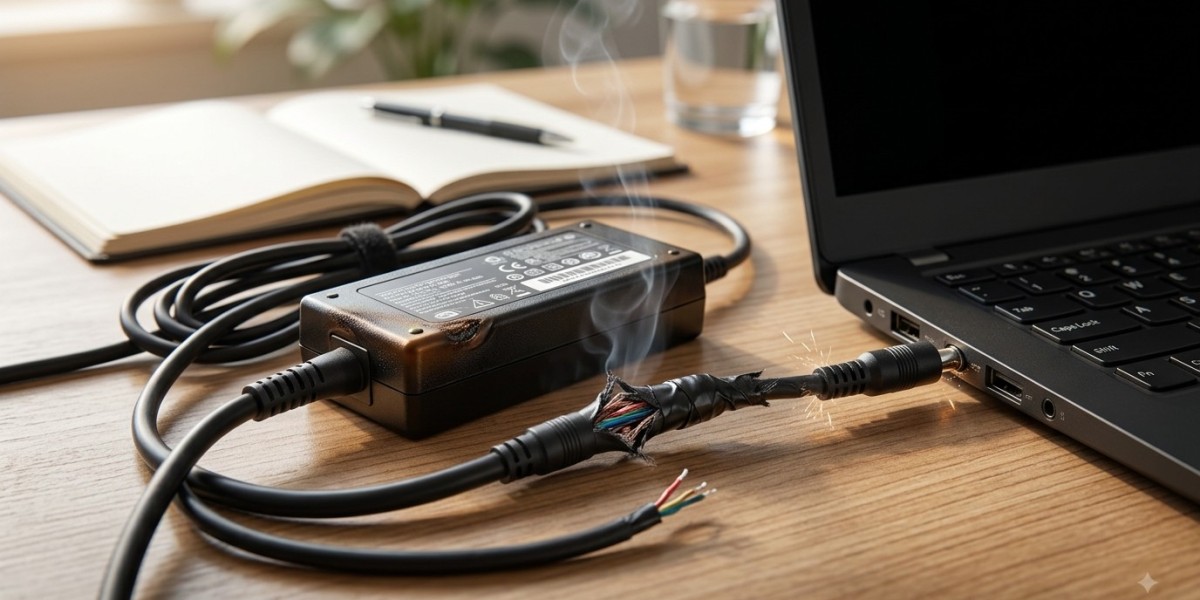


A laptop power adapter is one of those accessories that is easy to overlook until something goes wrong. It supplies the electricity needed to charge the battery and operate the laptop when connected to an outlet. When an adapter begins to fail, the symptoms can range from intermittent charging to unexpected shutdowns and complete power loss. Recognizing these warning signs early can prevent inconvenience and help avoid unnecessary damage to other components.
A faulty adapter can sometimes be confused with a weak battery, damaged charging port, or motherboard problem. That is why accurate diagnosis matters before purchasing replacement parts. iPC Repair Houston can help identify whether a laptop's charging issue originates from the adapter or another component. If the laptop has also experienced physical damage, laptop screen repair Houston can be handled alongside a broader hardware inspection.
What Does a Laptop Power Adapter Do?
The power adapter converts electricity from a wall outlet into the appropriate electrical power required by the laptop. It also works with the laptop's charging system to recharge the internal battery.
A typical adapter includes:
- Power brick
- AC power cable
- DC charging cable
- Connector tip
Each part can potentially develop a problem. A damaged cable, loose connection, internal adapter failure, or incompatible replacement can affect how reliably the laptop receives power.
The Laptop Charges Only Sometimes
One of the clearest warning signs of an unreliable adapter is intermittent charging. The laptop may recognize the charger one moment and stop charging shortly afterward.
You might notice the charging indicator repeatedly switching between connected and disconnected.
This can happen because of:
- Internal cable damage
- Worn connector
- Faulty adapter circuitry
- Loose connections
- Damaged charging port
Try not to repeatedly move or bend the cable to maintain a connection. Doing so may worsen an existing problem.
Charging Becomes Extremely Slow
A failing adapter may not always stop working completely. Instead, it may provide inconsistent or insufficient power.
If your laptop takes considerably longer to charge than it normally does, investigate the cause. Slow charging can also result from battery degradation, high system activity, overheating, or charging settings.
For example, a laptop performing demanding tasks while connected to a weak or incompatible adapter may charge very slowly or even continue losing battery percentage despite being plugged in.
The Battery Drains While Plugged In
Another important warning sign is a battery that continues losing charge while the laptop is connected to the adapter.
This can happen when the adapter is unable to provide enough power for the laptop's current workload. It may also indicate a defective battery, damaged charging port, or internal power problem.
If the battery percentage continues falling during ordinary use while plugged in, the charging system should be checked rather than assuming the battery is automatically responsible.
The Adapter Becomes Unusually Hot
Power adapters can become warm during normal operation. However, excessive heat is a reason to pay attention.
Warning signs include:
- Adapter becoming extremely hot
- Burning or unusual smells
- Discoloration
- Cracked casing
- Melting plastic
- Unusual electrical sounds
If an adapter becomes dangerously hot or produces a burning smell, disconnect it and stop using it. Continuing to operate damaged electrical equipment may create additional risks.
Damaged or Frayed Cables
The cable connecting the adapter to the laptop can experience significant wear, particularly when the laptop is frequently moved.
Inspect the cable for:
- Frayed sections
- Cuts
- Exposed wires
- Severe bends
- Loose connector ends
- Damaged insulation
Even minor-looking cable damage can interfere with stable power delivery. Avoid wrapping the cable extremely tightly around the adapter because repeated stress can damage internal wiring.
The Charging Connector Feels Loose
A loose connector can indicate either adapter damage or a problem with the laptop's charging port.
If the connector moves excessively inside the port or charging stops when the laptop is slightly repositioned, professional inspection is recommended.
Do not force the connector or use objects to hold it in a particular position. Doing so can place additional stress on the charging port.
Unexpected Shutdowns
A laptop that suddenly turns off while connected to power may have a problem with the adapter, battery, charging system, overheating, or motherboard.
If the laptop works normally with one adapter but repeatedly shuts down with another, the original adapter becomes a strong suspect.
However, repeated shutdowns should still be professionally diagnosed because multiple hardware problems can produce similar symptoms.
Adapter Compatibility Matters
Using an adapter simply because its connector fits the laptop does not necessarily mean it is compatible.
Voltage, current, wattage, connector specifications, and manufacturer requirements all matter. An unsuitable adapter may fail to charge the battery correctly or may cause unstable operation.
When replacing a power adapter, use a properly compatible model designed for the specific laptop.
Avoid extremely cheap or questionable replacement adapters that do not provide reliable specifications.
Charging Problems May Not Be the Adapter
It is important to remember that the power adapter is only one part of the charging system.
Other possible causes include:
- Worn battery
- Damaged charging port
- Faulty motherboard circuitry
- Corroded internal connections
- Power-management problems
- Liquid damage
- Physical impact
Professional diagnostics can help identify the actual source instead of replacing multiple components unnecessarily.
Physical Damage Can Affect Power and Display Systems
A laptop dropped or damaged in an accident may develop more than one problem. An impact can loosen internal connections, damage the charging port, affect the battery, or harm display components.
If the same incident causes cracked glass, flickering, lines, or a black display, laptop screen repair Houston may be required.
For people searching for screen repair Houston TX, it is useful to have the entire laptop evaluated after significant physical damage rather than focusing exclusively on the visible screen problem.
What to Do When You Suspect Adapter Failure
If you believe your adapter is failing, begin with a visual inspection. Look for damaged cables, overheating, unusual smells, or physical cracks.
You should also:
- Stop using an adapter showing serious physical damage.
- Avoid bending or twisting the charging cable.
- Use a compatible replacement if testing another adapter.
- Monitor whether charging behavior changes.
- Back up important files if power interruptions are occurring.
- Seek professional diagnostics when symptoms continue.
Avoid attempting to open or repair the adapter yourself because internal electrical components can be hazardous.
How to Reduce Power Adapter Wear
Proper handling can help extend adapter life.
Keep these habits in mind:
- Avoid sharply bending the cable.
- Do not place heavy objects on the adapter.
- Keep the power brick properly ventilated.
- Disconnect it carefully by the connector rather than pulling the cable.
- Keep it away from liquids.
- Store the cable loosely when traveling.
- Use the correct adapter for your laptop.
These simple precautions can reduce unnecessary cable and connector damage.
When Professional Help Is Recommended
Professional assistance is appropriate when charging remains inconsistent after checking the adapter, or when the laptop shuts down unexpectedly, refuses to recognize power, or shows signs of physical damage.
At iPC Repair Houston, technicians can evaluate the adapter, battery, charging port, power circuitry, and related hardware to determine where the problem originates.
A professional inspection can prevent unnecessary part replacement and help identify issues before they become more disruptive.
Conclusion
A failing laptop power adapter can reveal itself through intermittent charging, slow battery replenishment, excessive heat, damaged cables, loose connectors, battery drain while plugged in, or unexpected shutdowns. Because similar symptoms can also result from battery, charging-port, or motherboard problems, proper diagnosis is important before replacing components.
If your laptop has also experienced an accident that damaged its display, laptop screen repair Houston and screen repair Houston TX services may be needed alongside power-related diagnostics. With professional assistance from iPC Repair Houston, you can identify the real cause of charging problems and choose the right repair or replacement solution. Recognizing adapter problems early can help reduce downtime and keep your laptop operating reliably.









