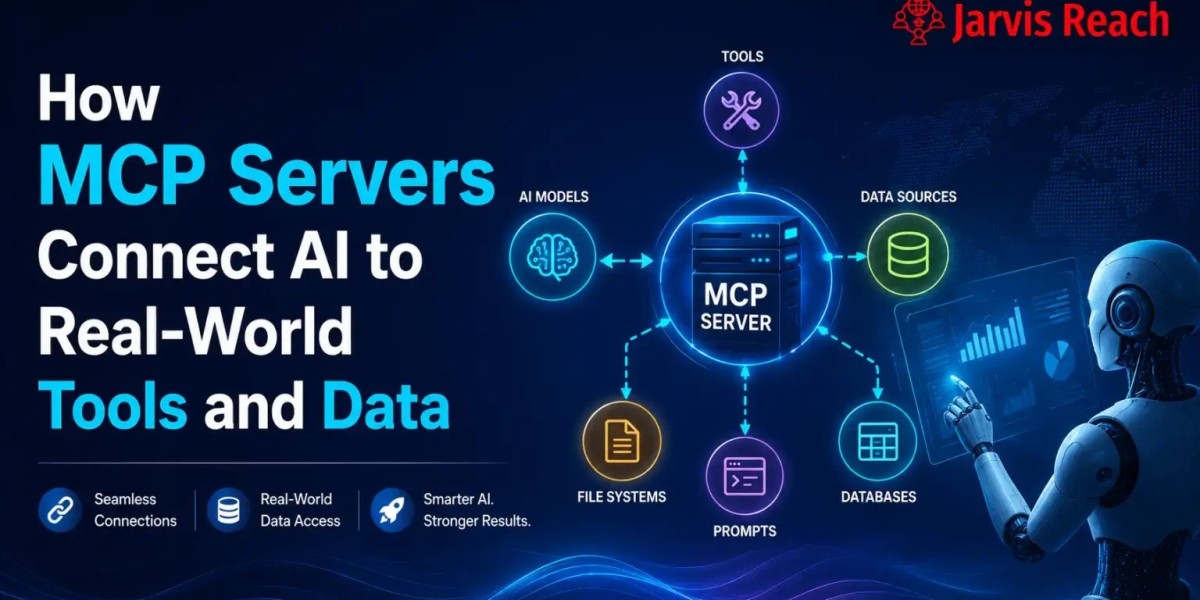


Artificial intelligence is becoming an essential part of modern software, but AI models are only as useful as the data and tools they can access. Businesses often store valuable information in SQL databases, file systems, APIs, and enterprise applications, making integration a critical challenge. This is where an MCP Server becomes valuable.
An MCP Server uses the Model Context Protocol (MCP) to provide a standardized way for AI platforms to connect with external systems securely and efficiently. Instead of creating separate integrations for every application, developers can use MCP to give AI assistants controlled access to enterprise resources.
This guide explains what an MCP Server is, how it works, and why it is becoming a key technology for enterprise AI.
What Is an MCP Server?
An MCP Server is a service that implements the Model Context Protocol, allowing AI models to communicate with external tools, APIs, databases, and business systems using a common standard.
It acts as a bridge between AI applications and the resources they need to complete tasks, retrieve information, or automate workflows.
Rather than building custom integrations for every AI model, developers create an MCP Server once and allow compatible AI applications to connect through an MCP Client.
How an MCP Server Works
An MCP environment typically includes three main components.
MCP Client
The MCP Client connects an AI platform to one or more MCP Servers. It sends requests, receives responses, and manages communication between the AI model and external resources.
MCP Server
The MCP Server exposes tools and services such as APIs, SQL databases, enterprise software, and file systems in a secure and standardized format.
External Resources
These resources can include:
- APIs
- Enterprise data
- SQL databases
- Cloud applications
- Internal software
- File systems
- Business services
Together, these components allow AI to work with live information instead of relying only on its training data.
Why Businesses Use MCP Server
Organizations are adopting MCP because it simplifies AI integration while improving security and scalability.
Key benefits include:
- Standard communication protocol
- Faster AI development
- Secure data access
- Reduced integration costs
- Easier maintenance
- Better interoperability
- Enterprise-ready architecture
These advantages make MCP ideal for companies building AI-powered products and internal business tools.
MCP Client Explained
The MCP Client serves as the communication layer between AI models and MCP Servers.
Its responsibilities include:
- Connecting to available servers
- Discovering available tools
- Sending structured requests
- Receiving responses
- Managing authentication
- Handling permissions
One client can communicate with multiple servers simultaneously, making it easy to combine different business services.
API Integration
Modern software depends heavily on APIs.
An MCP Server enables AI applications to interact with APIs securely for tasks such as:
- Retrieving customer information
- Updating CRM records
- Creating support tickets
- Managing inventory
- Processing orders
- Running automated workflows
This approach reduces development complexity while making AI applications more powerful.
Enterprise Data Access
Most organizations store critical information across multiple business systems.
Using MCP, AI assistants can securely access enterprise data from:
- Customer relationship management systems
- Human resource platforms
- Financial software
- Internal documentation
- Knowledge bases
- Business intelligence tools
This allows AI to deliver accurate, context-aware responses using real-time company information.
Connecting SQL Databases
Many enterprise applications rely on SQL databases for storing structured information.
An MCP Server can connect AI applications with databases including:
- MySQL
- PostgreSQL
- Microsoft SQL Server
- Oracle Database
- SQLite
This enables AI to retrieve reports, answer business questions, and analyze operational data quickly.
Managing Multiple Data Sources
Business information is rarely stored in one place.
An MCP Server combines multiple data sources, such as:
- REST APIs
- SQL databases
- Cloud storage
- File systems
- Internal applications
- Enterprise software
By connecting multiple sources, AI platforms can provide more complete and accurate answers.
Prompt Templates
Organizations often use prompt templates to standardize AI interactions.
Benefits include:
- Consistent AI responses
- Improved workflow automation
- Easier prompt management
- Better compliance
- Reduced manual effort
Prompt templates help teams maintain quality while scaling AI across departments.
Authentication and Security
Protecting business information is essential.
An MCP Server supports secure authentication methods including:
- API Keys
- OAuth
- Access Tokens
- Single Sign-On (SSO)
- Role-Based Access Control (RBAC)
These authentication methods ensure that AI applications only access authorized resources.
Stateful vs Stateless Communication
MCP implementations can support both stateless and stateful communication models.
Stateless
A stateless request is processed independently without remembering previous interactions.
Benefits include:
- Faster performance
- Easy scalability
- Lower resource usage
Stateless communication is ideal for simple API requests.
Stateful
Stateful communication preserves conversation history and context.
Advantages include:
- Personalized responses
- Multi-step workflows
- Context-aware conversations
- Better user experiences
Many enterprise AI assistants rely on stateful communication for customer support and productivity.
Working with File Systems
Many businesses store important information in file systems.
An MCP Server allows AI applications to work with:
- PDF documents
- Microsoft Word files
- Excel spreadsheets
- CSV files
- Text documents
- Shared folders
This makes it easier for AI to summarize documents, answer questions, and retrieve important information.
Supported Backends
An MCP Server can connect with many backend technologies.
Common backends include:
- REST APIs
- GraphQL APIs
- SQL databases
- NoSQL databases
- Cloud storage
- Internal business applications
- Enterprise software
- Microservices
This flexibility allows organizations to integrate AI without replacing existing infrastructure.
Enterprise Use Cases
Businesses use MCP Server across many industries.
Popular applications include:
- Customer support automation
- IT help desk assistants
- HR knowledge systems
- Sales enablement
- Business reporting
- Financial analysis
- Software development
- Internal documentation search
- Workflow automation
- Enterprise AI assistants
These use cases improve efficiency while reducing repetitive work.
Benefits of MCP Server
Using an MCP Server provides several advantages:
- Standard AI integration
- Secure authentication
- Enterprise data connectivity
- SQL database support
- API integration
- Multiple data source access
- Prompt template management
- Stateful and stateless workflows
- File system integration
- Flexible backend compatibility
Conclusion
An MCP Server is becoming a fundamental component of enterprise AI by providing a secure and standardized way to connect AI platforms with APIs, SQL databases, enterprise data, file systems, and business backends. Combined with an MCP Client, strong authentication, prompt templates, and support for both stateful and stateless communication, MCP enables organizations to build intelligent, scalable, and secure AI applications. As businesses continue adopting AI, MCP Server will play an increasingly important role in connecting language models with real-world systems and data.