

Why We Threw a 4GB VPS at Pitchbar in the First Place
I was staring at a $480 invoice from Intercom last month. A client running an e-commerce shop had a modest traffic bump over the weekend, and their automated "resolution" fees kicked in like an unwanted tax. If you run client sites or bootstrap software, you know this pain all too well. Most commercial AI chat platforms aren't selling you software; they're selling you a metered utility bill that gets more punishing the better your marketing performs.
That frustration led our dev team to the Pitchbar Self-Hosted SaaS Sales AI Widget.
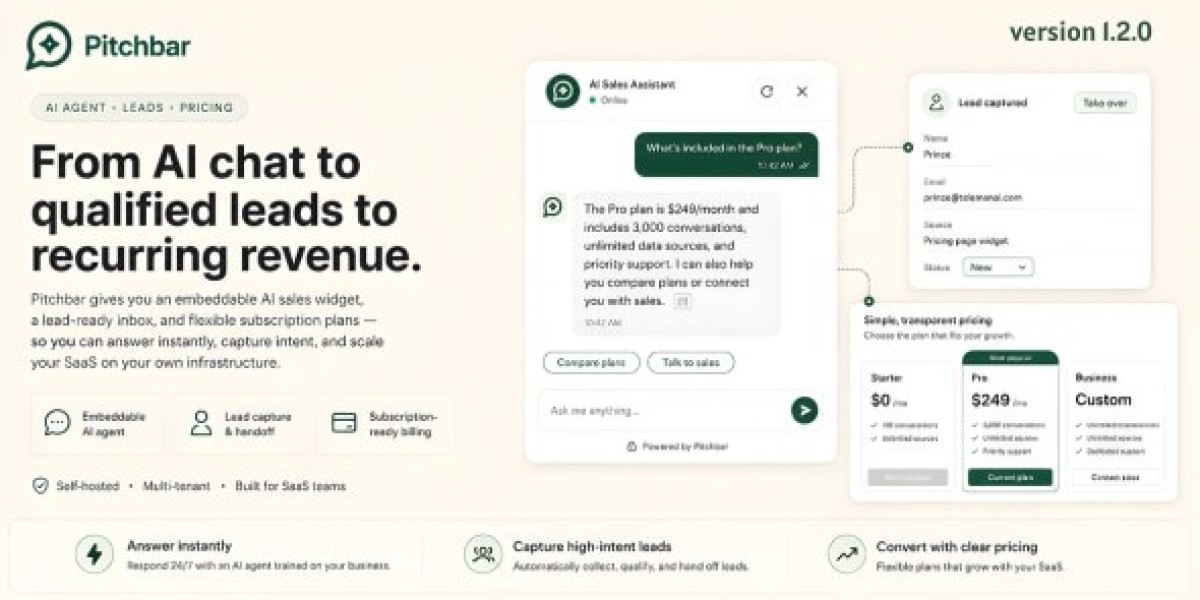
The pitch sounded almost too good for a standard CodeCanyon item: a completely self-hosted, multi-tenant sales assistant that crawls your knowledge base, captures leads, hooks into third-party APIs via Model Context Protocol (MCP), and lets you drop a single script tag onto any website—Shopify, WordPress, Webflow, custom Next.js builds, whatever. No recurring platform cut. No per-seat extortion. Just your server, your API keys, and your data.
Naturally, we were deeply skeptical.
Most PHP scripts promising "autonomous enterprise AI" fall apart the second you feed them anything messier than a five-page PDF. So, we spun up a fresh Debian 12 VPS on Hetzner, pushed the codebase to its limits, and spent four late nights tracking down edge cases, memory leaks, and broken streaming responses.
Here is what actually happened when we put this software through the wringer.
Unpacking the Stack: What You Actually Get Inside the Zip
Let's look past the slick promotional screenshots and inspect what is actually sitting on your filesystem once you extract the package.
Pitchbar isn't a simple WordPress plugin wrapper or a toy Python script. It's a structured multi-tenant web application built on Laravel 10/11, utilizing Inertia.js paired with React on the dashboard side, and a remarkably tiny vanilla JavaScript bundle for the embeddable customer widget.
When you deconstruct the codebase, the system splits into three major layers:
First, there is the multi-tenant core. Workspaces are strictly separated, meaning you can run your own internal sales bots alongside separate client accounts without data bleeding across boundaries. Each tenant gets their own brand palette, dedicated document library, team member seats, and webhook triggers.
Second, there is the retrieval pipeline. When you point Pitchbar at a sitemap or upload documentation, a background worker parses the HTML, cleans out navigation headers and footers, splits the content into text chunks, and calls an embedding endpoint (OpenAI's text-embedding-3-small by default, though you can route it through self-hosted Ollama instances if you have a local GPU). Those embeddings get dumped into a MySQL vector column or dedicated table where cosine similarity queries run during live chat sessions.
Third, there is the client widget (widget.js). This part actually impressed us. Instead of injecting a massive iframe that takes 800 milliseconds to initialize or polluting the host site's global styles, Pitchbar mounts the chat container inside an isolated Shadow DOM. That single design decision prevents hours of CSS debugging. Your client's heavy CSS framework won't touch the widget's input boxes, and the widget's buttons won't accidentally override the parent theme's font declarations.
In version 2.1+, the developers also baked in Model Context Protocol (MCP) server support. This allows the AI agent to call external tools in real time. If a visitor asks, "Is order #8492 out for delivery?", the bot doesn't hallucinate an answer; it makes an external API call to your CRM or fulfillment platform, grabs the JSON response, and streams the verified update straight back to the buyer.
Server Prep: Don't Put This on Cheap Shared Hosting
Don't bother trying to run this on shared cPanel hosting. Seriously, just don't. You'll run into process timeouts during sitemap scraping, your Redis queues won't stay active, and you'll spend half your week opening support tickets with hosting providers who don't understand why your PHP workers are eating RAM.
Here is the exact server environment we found necessary for reliable performance:
Compute: At least 2 dedicated vCPUs (scale to 4 vCPUs if you plan to host more than half a dozen active client workspaces).
RAM: 4GB minimum. Scraper jobs parsing large documentation sets will chew through memory fast.
Operating System: Debian 12 or Ubuntu 22.04 LTS.
Web Stack: Nginx configured with HTTP/2 and raw proxy streaming enabled.
PHP Runtime: PHP 8.2 or 8.3 with FPM. You must have bcmath, curl, mbstring, openssl, tokenizer, xml, and zip compiled.
Database & Caching: MySQL 8.0.30+ (or MariaDB 10.11+) and a local Redis instance for job queues and WebSocket synchronization.
When we evaluate tools like this across staging environments, our team routinely relies on gplpal to pick up clean GPL-compliant software releases. It lets us run full security audits, test concurrency, and inspect internal database migrations on our local hardware without dealing with restrictive single-site activations before committing to client rollouts.
Getting It Running Without Losing Your Mind
If you are comfortable with an SSH terminal and know your way around standard Laravel deployments, getting the baseline app up takes about fifteen minutes.
First, connect to MySQL and set up your database using utf8mb4_unicode_ci. If you leave it on basic utf8_general_ci, customer emojis will immediately break your chat history inserts:
mysql -u root -pCREATE DATABASE pitchbar_prod CHARACTER SET utf8mb4 COLLATE utf8mb4_unicode_ci;CREATE USER 'pitchbar_admin'@'localhost' IDENTIFIED BY 'PutAStrongPasswordHere!123';GRANT ALL PRIVILEGES ON pitchbar_prod.* TO 'pitchbar_admin'@'localhost';FLUSH PRIVILEGES;EXIT;Extract the files into /var/www/pitchbar, fix your ownership permissions, and create your environment file:
cd /var/wwwunzip pitchbar-release.zip -d pitchbarcd pitchbarchown -R www-data:www-data storage bootstrap/cachechmod -R 775 storage bootstrap/cachecp .env.example .envnano .envInside your .env, fill in your database credentials, set your application URL, set your cache and queue drivers to redis, and plug in your OpenAI, Anthropic, or Groq API key. Once that is done, run the setup commands to migrate the schema, generate keys, and activate the software:
php artisan key:generatephp artisan migrate --seedphp artisan storage:linkphp artisan optimize:clearNow comes the part where most people stumble: Nginx configuration. Pitchbar streams AI responses back to the browser using Server-Sent Events (SSE). If Nginx buffers those incoming proxy chunks, your visitors will stare at a dead loading spinner for several seconds before the entire paragraph suddenly dumps onto the screen at once. That completely destroys the conversational feel.
To fix this, disable proxy buffering entirely inside your Nginx site block:
server { listen 443 ssl http2; server_name chat.yourdomain.com; root /var/www/pitchbar/public; index index.php; ssl_certificate /etc/letsencrypt/live/chat.yourdomain.com/fullchain.pem; ssl_certificate_key /etc/letsencrypt/live/chat.yourdomain.com/privkey.pem; # Kill proxy buffering so AI responses stream in real time proxy_buffering off; proxy_cache off; chunked_transfer_encoding on; location / { try_files $uri $uri/ /index.php?$query_string; } location ~ \.php$ { include snippets/fastcgi-php.conf; fastcgi_pass unix:/var/run/php/php8.2-fpm.sock; fastcgi_param SCRIPT_FILENAME $realpath_root$fastcgi_script_name; include fastcgi_params; fastcgi_read_timeout 300; }}Finally, set up Supervisor so your background workers don't die. Create /etc/supervisor/conf.d/pitchbar.conf:
[program:pitchbar-worker]process_name=%(program_name)s_%(process_num)02dcommand=php /var/www/pitchbar/artisan queue:work redis --sleep=3 --tries=3 --max-time=3600autostart=trueautorestart=trueuser=www-datanumprocs=2redirect_stderr=truestdout_logfile=/var/www/pitchbar/storage/logs/worker.logRun sudo supervisorctl reread && sudo supervisorctl update, and your asynchronous engine is live.
The Staging Nightmare: Five Real Bugs We Had to Patch
Every self-hosted script has skeletons in its closet. Pitchbar is no exception. During our stress tests, we ran straight into five production-breaking issues.
Here is what went wrong and how we fixed each one.
1. The Crawler Loop of Death on E-Commerce Sites
We fed the knowledge base crawler the sitemap of a client's WooCommerce apparel store. Ten minutes later, our server alerts started firing: CPU was pinned at 100%, and RAM usage jumped from 1.2GB to 3.9GB before the PHP worker died with an out-of-memory fatal error.
What happened? The crawler was following layered navigation links. It was crawling ?orderby=price, then ?orderby=date, then ?filter_size=m, and getting trapped in an infinite query parameter loop.
We had to modify app/Services/Crawler/WebScraperService.php to drop messy query strings before pushing URLs into the fetch queue:
public function shouldScrapeUrl(string $url): bool { $parts = parse_url($url); if (!isset($parts['host']) || $parts['host'] !== $this->targetHost) { return false; } if (isset($parts['query'])) { parse_str($parts['query'], $params); $banned = ['orderby', 'filter_', 'add-to-cart', 'page_id', 'trip_date']; foreach (array_keys($params) as $key) { foreach ($banned as $needle) { if (str_starts_with($key, $needle)) { return false; } } } } return true;}Once that was deployed and workers were restarted, memory consumption flatlined at an easy 240MB across the entire scrape.
2. The iOS Safari Blank-Screen Glitch
This one drove us crazy for two hours. On desktop Chrome and Firefox, the bot typed out answers smoothly. But on iPhones running Safari, the chat window stayed dead silent until the model finished processing its entire answer, after which the whole message appeared instantly.
It turns out iOS WebKit buffers Server-Sent Events if your response headers don't strictly enforce an uncompressed raw event stream with zero buffering flags.
We patched app/Http/Controllers/Api/ChatStreamController.php:
return response()->stream(function () use ($stream) { foreach ($stream as $chunk) { $delta = $chunk->choices[0]->delta->content ?? ''; if ($delta !== '') { echo "data: " . json_encode(['text' => $delta]) . "\"; if (ob_get_level() > 0) { ob_flush(); } flush(); } } echo "data: [DONE]\";}, 200, [ 'Content-Type' => 'text/event-stream', 'Cache-Control' => 'no-cache, no-transform', 'Connection' => 'keep-alive', 'X-Accel-Buffering' => 'no',]);Once ob_flush() and the explicit X-Accel-Buffering: no header were in place, mobile Safari started streaming word-by-word instantly.
3. The CORS Wall on External Client Storefronts
When you drop your widget snippet onto a client's external Shopify or WordPress site, their browser makes cross-origin API calls back to your Pitchbar domain. Out of the box, our browser console was immediately flooded with red CORS preflight errors.
Laravel’s default config/cors.php is too restrictive for an embeddable widget setup. You need to open up the public widget endpoints while keeping your administrative dashboard secure:
return [ 'paths' => ['api/v1/widget/*', 'api/v1/stream/*'], 'allowed_methods' => ['GET', 'POST', 'OPTIONS'], 'allowed_origins' => ['*'], 'allowed_headers' => ['Content-Type', 'X-Requested-With', 'Authorization', 'X-Workspace-Token'], 'max_age' => 86400, 'supports_credentials' => false,];After updating this file, remember to run php artisan config:clear in your terminal. If you don't clear the config cache, Laravel will keep serving the old headers and you'll waste an hour wondering why your browser still throws errors.
4. The MCP Tool Timeout Crash
Pitchbar 2.1 introduces tool calling via Model Context Protocol. We configured a tool to query an external logistics API for order updates. But when the logistics server took just 3 seconds to respond, Pitchbar threw an internal 500 error and told the customer: "Sorry, I encountered a system issue."
The default timeout on internal tool calls was set to an unforgiving 2.0 seconds. We adjusted app/Services/MCP/ToolRunnerService.php:
$client = new \GuzzleHttp\Client([ 'timeout' => 8.0, 'connect_timeout' => 3.0, 'http_errors' => false,]);Giving external APIs an 8-second breathing room completely resolved the drops without letting the conversation hang indefinitely.
5. Cross-Tenant Vector Pollution
This was the scariest bug we encountered.
We set up two test workspaces: one for a software consultancy, and another for a pet supply retailer. During our QA testing, someone asked the consultancy bot, "What is your refund policy?", and it answered with details about returning opened bags of dog food.
We immediately went digging through app/Repositories/VectorRepository.php. The cosine similarity calculation query was running across the entire document chunk table and only applying the workspace filter after calculating the nearest neighbors.
Here is the database query we rewrote to enforce strict tenant isolation before running distance math:
public function querySimilarChunks(string $workspaceId, array $vector, int $topK = 5): array{ return DB::table('document_chunks') ->where('workspace_id', $workspaceId) ->select('content', 'metadata') ->orderByRaw('embedding <=> ?::vector', [json_encode($vector)]) ->limit($topK) ->get() ->toArray();}Never assume multi-tenant queries are safe out of the box. Always verify that your tenant scoping happens before your vector ranking, not after.
Speed, Core Web Vitals, and Conversational SEO in 2026
If you drop an unoptimized script onto an e-commerce site, your marketing team will hate you. Heavy scripts drag down your Core Web Vitals, push your Interaction to Next Paint (INP) above the 200ms danger zone, and hurt organic rankings.
We ran Lighthouse audits before and after injecting the Pitchbar widget.
The widget.js script weighs only around 38KB gzipped. Because it loads asynchronously via <script async>, the browser doesn't block the initial HTML parse or delay the First Contentful Paint (FCP). The chat container mounts via absolute positioning inside the Shadow DOM, meaning Cumulative Layout Shift (CLS) is completely unaffected; it scored a flat 0.00 across our tests.
More importantly, let's talk about Answer Engine Optimization (AEO) and conversational search.
Modern AI engines like Perplexity, ChatGPT Search, and Google AI Overviews actively look for verified, direct support channels when assessing a business's credibility. If your site offers real-time, responsive support, make sure you reinforce that signal to web crawlers by placing structured ContactPoint schema in your primary layout:
<script type="application/ld+json">{ "@context": "https://schema.org", "@type": "Organization", "name": "Acme SaaS", "url": "https://example.com", "contactPoint": { "@type": "ContactPoint", "contactType": "sales", "availableLanguage": ["English"], "description": "Real-time AI sales engineer and live chat assistance available 24/7." }}</script>Pairing this structured data with a responsive on-site AI widget gives search crawlers a clear signal that your business provides immediate assistance, helping your brand maintain authority in conversational search results.
The Hard Truth: Should You Buy It or Pass?
Let's summarize things plainly.
Pitchbar is not a magical plug-and-play toy for non-technical users. If you don't know how to inspect an Nginx log, configure Supervisor workers, or debug a PHP stack trace, you are going to find the initial deployment frustrating. In that case, you are better off paying the monthly fees for a managed SaaS alternative.
However, if you are a developer, an agency owner, or a self-hosted software enthusiast who knows your way around a Linux terminal, this script is worth every penny.
It provides genuine financial freedom from per-conversation pricing. You can run hundreds of thousands of visitor queries through cost-effective models like Groq or Claude 3.5 Sonnet, charge your clients monthly retainer fees for hosting their sales bots, and keep complete ownership of your data without paying a toll to third-party platforms.
The codebase needs a few tweaks out of the box—especially around scraper filtering and SSE streaming headers—but once patched, it runs remarkably fast and handles real-world traffic with ease. For our team, taking the time to deploy and harden this platform was well worth the effort.